
I bought NeuronWriter on AppSumo in 2022, five codes in total, and I have never used its editor by hand. Since July 2026 it has been one stage of an automated pipeline that writes and updates articles for a Romanian appliance-review site I run, and I work with it from Claude Code rather than from the browser. So this is not a review of the writing editor. It is a review of NeuronWriter as something an AI agent or a script talks to, with my own numbers.
Disclosure: the NeuronWriter links on this page are affiliate links. If you buy through them, I earn a commission at no extra cost to you. Prices were checked on October 22, 2026.
What I paid, and what it buys today
I bought three codes in July and September 2022 at $59 each and two more in November 2022 at $69 each: $315 in total. Stacked, they give my account 150 content analyses a month, 75,000 AI credits a month and 50 projects. Those are the same limits as today’s top plan, Diamond.
| Diamond | Price today | Four years at today’s price |
|---|---|---|
| Monthly subscription | $117 a month | $5,616 |
| Yearly subscription | $1,170 a year | $4,680 |
| Lifetime licence | $895 one-time | $895 |
| My 2022 AppSumo codes | $315 one-time | $315 |
The AppSumo deal is long gone, but NeuronWriter still sells lifetime licences directly: Bronze at $179 (25 analyses a month), Gold at $537 (75) and Diamond at $895 (150). All three include API access. On the monthly plans, API and MCP access start at Gold, which is $69 a month or $690 a year. That makes the Gold lifetime licence cheaper than one year of the Gold subscription.
How the pipeline uses it
The pipeline makes two calls to NeuronWriter for every article:
- Before writing, it creates an analysis for the article’s keyword. NeuronWriter reads the top results on Google and returns the terms they use, the questions people ask and a target word count. The pipeline turns that into a short brief and puts it into the prompt that writes the article.
- After publishing, it sends the finished page back and gets a content score out of 100, which is logged next to the article.
Only the first call costs anything: creating an analysis uses one of the 150 monthly credits. Listing analyses, reading them, tagging them and scoring a page are free, so the pipeline checks whether an analysis for the same keyword already exists before it creates a new one.
Here is how much of the allowance I have actually used. July was the setup month, when I scored every existing article and ran some keyword research. October includes a batch of new topics and refreshes.
| Month (2026) | Analyses used | Of |
|---|---|---|
| July | 91 | 150 |
| August | 13 | 150 |
| September | 21 | 150 |
| October (to the 22nd) | 73 | 150 |
Why it works so well with Claude Code
This is the part I like most. The API is small and predictable: every call is a POST with a JSON body and an X-API-KEY header, and there are only a handful of endpoints. NeuronWriter also gives you an MCP server URL in your account, so an AI agent such as Claude Code can create analyses, read briefs and score pages directly, without any glue code. Most of the pipeline’s NeuronWriter code came out of asking Claude Code to try a call against my account and report what came back.
One warning that comes from that. An agent will happily spend your monthly quota for you. One morning of exploratory keyword research through the API and MCP used about 69 of my 150 analyses. Before any bulk work, have the agent list the analyses created this month and count them first. That call is free.
The mistake that wasted two months of scores
The page-scoring call takes both a URL and the page’s HTML. I assumed NeuronWriter would fetch the URL, so my pipeline sent a blank body. It does not fetch anything: it scores exactly the HTML you send. For two months every article was scored as an empty document, and I only noticed when an article that hit its word-count target scored zero. Same article, same analysis:
| What I sent | Content score |
|---|---|
| A blank body (my bug) | 7 |
| The full page HTML, with the article’s CSS class | 55 |
| Only the article section, cut out by my own code | 33 |
So send the whole page and tell NeuronWriter which CSS class holds the article. Cutting the article out yourself scored lower in my test, because my extraction lost part of the content.
Does the brief actually help?
Honestly, I can’t tell yet. Once scoring worked, I re-scored everything on the site. Articles written by the pipeline with a NeuronWriter brief average 41.5 out of 100 (58 articles). Older articles written before the pipeline, without one, average 58.9 (15 articles).
That looks bad for the brief, but the groups are not comparable. The older articles are narrow reviews of one product, while the pipeline writes broad “best fridge” style guides that compete against far more pages and have much higher word-count targets. A fair test would compare briefed and unbriefed articles on similar keywords, and I haven’t run that yet. What I can say is that a score in the 40s is normal for this kind of content, and a single-digit score almost always means the measurement is broken, not the article.
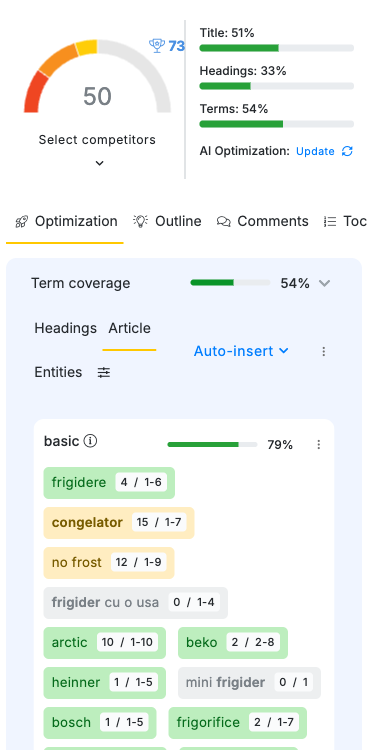
The score is also not a ranking. For the article in the screenshot, the page in first place on Google scores 37, the median of the top 10 is 45, and the 73 belongs to the page in tenth place. I treat the score as a check that an article covers the topic, not as a target to max out.
Has it made any money?
A little. In the last 120 days the site’s affiliate links produced 14 orders worth about 350 RON in commission (under $100). All 10 articles that earned commission were written by the pipeline, and 7 of them went through the NeuronWriter brief. Only one order, for 3.35 RON, is confirmed so far. The other 13 are still pending, because the store only confirms a sale after delivery and the return period, and three more orders were cancelled.
This doesn’t prove NeuronWriter made those sales. The pipeline also does product research, writing and images, and any of those could matter more. It only shows that the articles it helped brief are the ones earning.
Would I recommend it?
Yes, if you want SEO briefs inside an automated workflow or an AI agent. That is what I use it for, and the API and MCP access are the reason I’d buy it again. Get Gold or above, because API and MCP access are not included in the cheaper monthly plans, and expect to spend most of your analyses in the first month while you set things up.
If you write by hand, I can’t judge the editor, because I don’t use it. Look for a review from someone who does.
The lifetime licence is the better deal if you’ll use it for more than a year: Gold lifetime costs less than one year of Gold. The lifetime page doesn’t mention a refund guarantee, so check the terms before you buy. If you are not sure, start with a monthly plan. You can check the lifetime plans or the monthly and yearly plans.
I wrote more about the setup behind this pipeline in how I run Hermes Agent on my NAS.