
Updated October 2026 by Marius: retested in a real HTML/JavaScript gadget on a Blogger test blog (Contempo theme). The test turned up four problems in the previous version of the snippet, now fixed, and I rechecked the Feed and Popular Posts gadgets and the feed settings. Originally published by Hardeep Asrani in 2014.
There are two ways to show recent posts in Blogger: the built-in Feed gadget, which lists your latest post titles with no code, or a short HTML/JavaScript snippet that reads your blog’s feed and adds thumbnails, dates and a summary. Both go in through Layout, so you don’t need to edit your theme. Want the code? Skip to Method 2.
Method 1: The Feed gadget (no code)
In Blogger, click Layout in the left menu. In the area where the list should appear (usually the sidebar), click Add a Gadget and choose Feed.
For the feed URL, enter your own blog’s post feed, https://yourblog.blogspot.com/feeds/posts/default (use your custom domain if you have one), and click Continue. Then set the title, pick how many items to show (the menu stops at 5), tick Show item dates or Show item sources/author if you want them (there is also Open links in new window), and click Save.
On my test blog the Feed gadget printed each title as a link followed by the date (“Video only post – 10/27/2026”), with no images. If you would rather list your most-viewed posts, the Popular Posts gadget in the same list shows up to 10 posts with a thumbnail and a snippet (both on by default), ranked by views over all time, the last year, the last 30 days or the last 7 days. For your latest posts with images, use the code below.
Method 2: Recent posts HTML code with thumbnails
Go to Layout, click Add a Gadget where you want the list, choose HTML/JavaScript, give it a title such as “Recent Posts”, paste this into the content box and click Save:
<div id="recent-posts"></div>
<script>
function showRecentPosts(json) {
	var settings = {
		showThumbnails: true,
		showDate: true,
		showSummary: true,
		summaryLength: 100 // characters
	};
	var entries = json.feed.entry || [];
	var list = document.createElement('ul');
	list.className = 'recent-posts-list';
	for (var i = 0; i < entries.length; i++) {
		var entry = entries[i];
		var url = '';
		for (var k = 0; k < entry.link.length; k++) {
			if (entry.link[k].rel === 'alternate') {
				url = entry.link[k].href;
				break;
			}
		}
		var item = document.createElement('li');
		var source = entry.summary ? entry.summary.$t : (entry.content ? entry.content.$t : '');
		var html = new DOMParser().parseFromString(source, 'text/html');
		var thumb = '';
		if (entry.media$thumbnail) {
			thumb = entry.media$thumbnail.url;
			if (thumb.indexOf('img.youtube.com') > -1) {
				thumb = thumb.replace('/default.jpg', '/mqdefault.jpg'); // larger, no black bars
			} else {
				thumb = thumb.replace('/s72-c/', '/s144-c/').replace(/=s72-c$/, '=s144-c'); // 144px for sharp screens
			}
		} else if (html.querySelector('img')) {
			thumb = html.querySelector('img').getAttribute('src'); // image hosted outside Blogger
		}
		if (settings.showThumbnails && thumb) {
			var img = document.createElement('img');
			img.src = thumb;
			img.width = 72;
			img.height = 72;
			img.alt = '';
			img.loading = 'lazy';
			img.onerror = function () { this.remove(); };
			item.appendChild(img);
		}
		var link = document.createElement('a');
		link.href = url;
		link.textContent = entry.title.$t;
		item.appendChild(link);
		if (settings.showDate) {
			var date = document.createElement('time');
			date.dateTime = entry.published.$t;
			var ymd = entry.published.$t.substring(0, 10).split('-');
			date.textContent = new Date(ymd[0], ymd[1] - 1, ymd[2]).toLocaleDateString(undefined, { year: 'numeric', month: 'short', day: 'numeric' });
			item.appendChild(date);
		}
		if (settings.showSummary) {
			html.querySelectorAll('script, style, noscript').forEach(function (n) { n.remove(); });
			html.querySelectorAll('br, p, div, li, td, h2, h3, h4').forEach(function (n) { n.after(' '); });
			var text = html.body.textContent.replace(/\s+/g, ' ').trim();
			if (text.length > settings.summaryLength) {
				var cut = text.lastIndexOf(' ', settings.summaryLength);
				text = text.substring(0, cut > 0 ? cut : settings.summaryLength).replace(/[\s.,;:!?]+$/, '') + '\u2026';
			}
			var summary = document.createElement('p');
			summary.textContent = text;
			item.appendChild(summary);
		}
		list.appendChild(item);
	}
	document.getElementById('recent-posts').appendChild(list);
}
</script>
<script src="/feeds/posts/default?orderby=published&max-results=5&alt=json-in-script&callback=showRecentPosts"></script>
<style>
.recent-posts-list { list-style: none; margin: 0; padding: 0; }
.recent-posts-list li { overflow: hidden; margin: 0 0 14px; }
.recent-posts-list img { float: left; margin: 0 10px 4px 0; border-radius: 4px; object-fit: cover; }
.recent-posts-list a { font-weight: bold; text-decoration: none; }
.recent-posts-list time { display: block; font-size: 0.85em; opacity: 0.7; }
.recent-posts-list p { margin: 4px 0 0; font-size: 0.9em; }
</style>Code language: HTML, XML (xml)
Here is what it printed in the sidebar of my test blog, which has one post for each kind of image a Blogger post can have:
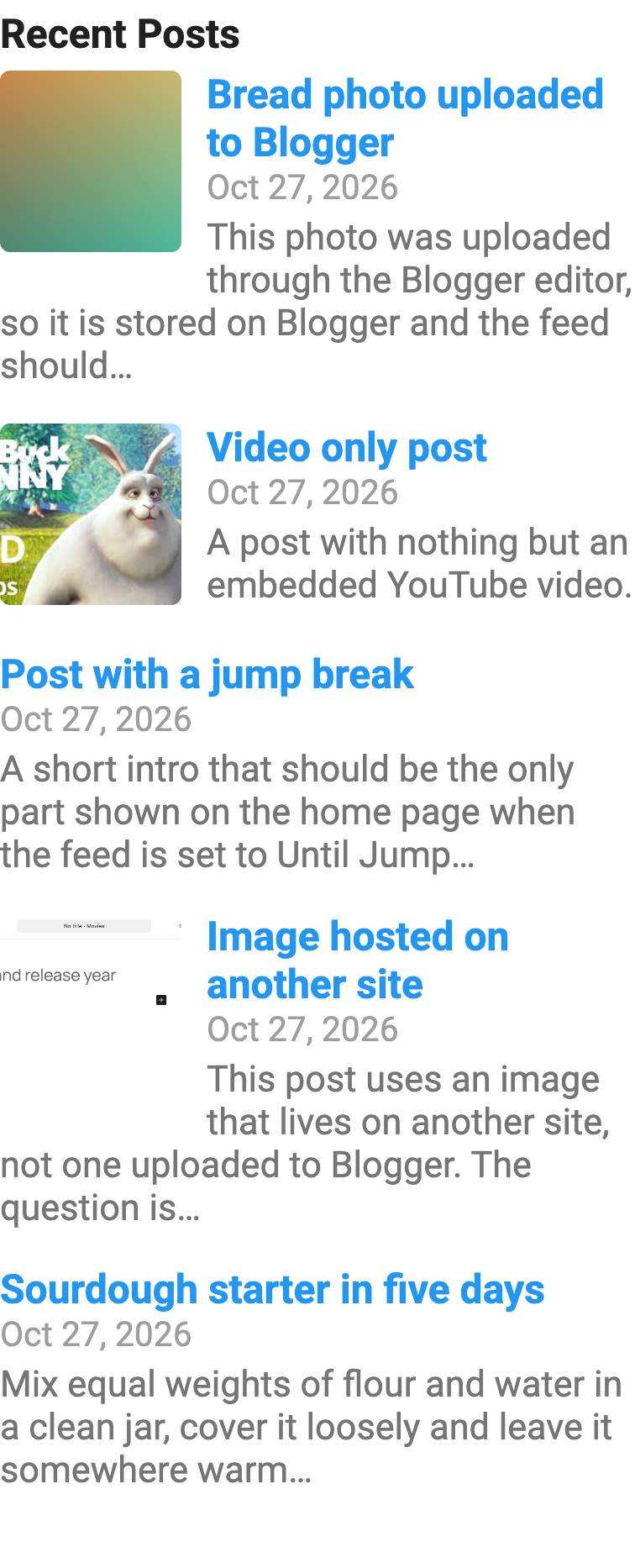
The snippet loads your blog’s own feed (/feeds/posts/default) as JSON and builds the list from it. To adjust it:
- Number of posts: change
max-results=5in the last<script>tag. - Thumbnails, dates, summaries: set
showThumbnails,showDateorshowSummarytofalseto hide them. - Summary length:
summaryLengthis the number of characters before the text is cut at the last full word before that limit. - One label only: change the feed path to
/feeds/posts/default/-/Recipes, replacingRecipeswith your label. The label is case-sensitive: on my test blog/-/Recipesreturned two posts and/-/recipesreturned none. - Scrollable box: add
.recent-posts-list { max-height: 320px; overflow-y: auto; }inside the<style>block to keep a long list in a fixed-height box with a scrollbar.
Where the thumbnails come from
Blogger only puts a thumbnail in the feed for some posts. I published one test post of each kind and checked the feed:
- Image uploaded through the Blogger editor: the feed has a 72px cropped thumbnail (
s72-cin the URL). The code asks for the 144px version so it stays sharp on high-resolution screens. - Embedded YouTube video: the feed has YouTube’s own 120×90 image, which has black bars at the top and bottom. The code swaps in YouTube’s 320×180 version, which has none.
- Image hosted on another site (an image linked from another site, not uploaded): the feed has no thumbnail at all. The code falls back to the first image in the post’s HTML. That fallback needs the full post in the feed, so it doesn’t work when the blog feed is set to Short, and it loads the full-size image, scaled down.
- No image: the post shows its title, date and summary without a picture.
object-fit: cover in the CSS crops every thumbnail to a square instead of squashing it.
If the list doesn’t show up
- On the Contempo theme, look in the menu. In browser windows narrower than 1440px, Contempo hides the sidebar behind the ☰ menu button at the top of the page, so open that menu to see the gadget.
- The blog feed is off. In Settings, under “Site feed”, set Allow blog feed to anything except None. With None, the feed returns a 404 page (“The feed specified by … is not enabled”) and the browser console shows that the feed script was refused. Full, Until Jump Break and Short all work. With Short, the summary comes from the excerpt Blogger puts in the feed.
- The blog is private. With Reader access set to “Private to authors”, the feed answered 401 even when I was logged in as the blog’s owner, so the snippet showed nothing. The built-in Feed gadget kept listing the posts (I was logged in as the owner), so use Method 1 on a private blog.
- The label has different capitals. Label feeds are case-sensitive (see above).
- Summaries end in
…. Blogger turned the “…” character in the gadget’s script into that entity. Replace any “…” in the script with\u2026, as the code above does. - You added it twice. The snippet uses a fixed
idand function name, so use it once per page.
What was wrong with older versions of this code
Older tutorials, including the first version of this one, had you paste a long script above </head> in the theme. Those scripts have aged badly: the plain and scrolling versions never defined numchars, so with their default settings they stop with an error after the first post title, and the thumbnail version prints “undefined” on blogs without comment links and falls back to a placeholder image that no longer exists. The snippet above replaces all three and lives entirely in one gadget.
The previous version of the snippet in this post ran without console errors, but in a real Blogger gadget it had four problems:
- Every cut-off summary ended in
…instead of “…”. Blogger saved the ellipsis character inside the gadget’s script as the HTML entity…, and JavaScript printed those six characters literally. The code now writes the ellipsis as'\u2026', which uses only plain ASCII characters and comes through unchanged. - YouTube thumbnails were squashed from 120×90 into a 72×72 square, black bars included.
- Posts with an image hosted elsewhere showed no thumbnail, because the code only looked at the feed’s thumbnail.
- Summaries ran words together. A post with two short paragraphs, a line break, a list and a
<style>tag came out as “Hi all!Line oneLine two.x{color:red}First itemSecond item”. The code now drops styles and scripts and adds a space after each paragraph, line break and list item: “Hi all! Line one Line two First item Second item”.
it gives an error (Error parsing XML, line 3098, column 58: The reference to entity “alt” must end with the ‘;’ delimiter.) when i save the template on this line
please help me to fix it
Which code are you talking about? And I’d recommend you to add the code to a widget instead of the template.
works great thanks
true, if you wanna share more views please share it with us at http://www.abhicontentwriter.com